Shared Libraries for an Embedded Operating System
This post is a summary of my masters thesis project. The full thesis can be found here
Virtually all software use libraries. With so much existing code out there, why would we implement everything from scratch?
On traditional computing platforms (which I’m defining as desktop and server), library code can be shared between multiple processes. This means that only one copy of the library code needs to live on a filesystem or loaded into memory.
Imagine a library such as a system’s C standard library (libc). There might be hundreds of processes all calling functions like printf or malloc. Why keep around hundreds of copies of the same code?
Due to the nature how shared libraries are decoupled from their application binary, it makes it easy to update software. If an update is needed in library code, it’s much easier to update a single shared library rather than to ask application developers to re-compile and re-link their code with the updated library.
Embedded Operating Systems?
Just to clear things up, when I refer to embedded devices, I mean microcontroller-class devices. Think of your ESP32s, Raspberry Pis, or Arduinos. Not something like a smartphone or a NVIDIA Jetson. These embedded devices might live inside an e-scooter or a lightbulb in a smart home.
Historically, embedded firmware has been simple enough to require a single unit of execution. These systems are usually only responsible for doing one simple task such as controlling a physical mechanism or collecting sensor data.
This single application is often a loop that follows the pattern of reading some input from hardware, processing that data, then responding to that input (i.e. modifying hardware or storing data) before repeating the cycle again. (Instead of polling for inputs, you could run respond to interrupt handlers, but the same single task paradigm applies)
As hardware become more capable and cheaper, embedded systems are taking on more complexities and are requiring multiprogramming capabilities. Some common embedded operating systems include Zephyr, FreeRTOS, and RIOT.
Why not share libraries?
Most embedded OSes don’t need to. Usually, all library and application code is statically compiled and linked into a single binary. The libraries are already “shared” in the sense that there’s a single copy which is callable from all application code.
However, the Tock operating system differs from its counterparts in its ability to execute multiple, isolated compilation units. Each application is compiled separately, meaning that each library must be compiled statically into each application. This execution model presents an opportunity for applications to share common library code and save limited flash storage.
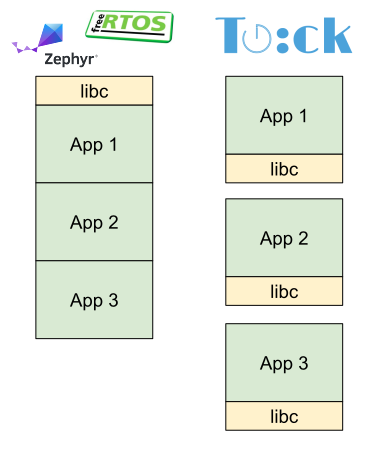
On the left, traditional embedded operating systems (such as Zephyr or FreeRTOS) statically link their library code with all applications. On the right, Tock OS has separate compilation units for each application so each library is linked separately with each application.
Shared Libraries on Linux
Before we dive deep into how shared libraries would work for embedded operating systems, let’s examine how they work in a more established setting: Linux.
On Linux, there are extra mechanisms at runtime to support shared libraries. One of which is the dynamic linker.
Dynamic Linking/Loading
Forget shared libraries for a second. Let’s take a step back and thinking about how library function calls work with statically linked libraries.
With static linking, all the library code a program needs is folded into the final executable at link-time. This means there is nothing to do at runtime; the process can keep executing and freely call into libraries by performing a jump to the known location of program memory.
int main(void) {
    lib_func();
}lib_func ; jmp 0x0004005C
jmp lib_func lib_func. After the jump, the processor executes the code in lib_func. This is equivalent to setting the program counter register to the location of the lib_func code in memory (which is 0x0004005C) in this case. In the case of statically linked libraries, the linker knows exactly where lib_func is located since it’s part of the same executable file as the rest of the application code. So, the jmp lib_func assembly is really syntactic sugar for jmp 0x0004005C (which is commented above). With shared libraries, this assumption breaks down. At link time, we don’t know where the shared library will exist in the process’ address space. The location of the shared library code might depend on how many other libraries are loaded, the order which they are loaded, etc.
Instead, we need an extra mechanism at runtime to tell the program where the library code is loaded in memory.
The dynamic linker is a program which is responsible for setting up a process for execution. It does so by resolving references to shared library symbols and setting up the process’s address space.
The dynamic linker runs before the code in your process ever starts. On Linux, if the kernel detects if the executable file is of the ELF format, the kernel reads the PT_INTERP field of the ELF program header to determine which dynamic linker to invoke.
You can use the readelf command line tool to print out the PT_INTERP field of an ELF program header. Get used to readelf as it’s crucial for digging into ELF files (here’s a useful guide).
readelf --program-headers /usr/bin/lsls binary. Feel free to replace /usr/bin/ls with the path to any ELF binary on your system. INTERP 0x0000000000000318 0x0000000000000318 0x0000000000000318
0x000000000000001c 0x000000000000001c R 0x1
[Requesting program interpreter: /lib64/ld-linux-x86-64.so.2]readelf --program-headers /usr/bin/ls which indicates that the requested “program interpreter” or dynamic linker is /lib64/ld-linux-x86-64.so.2 On modern Linux, the dynamic linker for ELF binaries is ld-linux.so. You can find it on your system in an architecture-specific location (on x86 systems this will be at
/lib64/ld-linux-x86-64.so.2).
The dynamic linker then identifies what shared libraries your program depends on. It does this by reading the DT_NEEDED entries of the “dynamic” section of the ELF binary. We can use readelf to inspect the shared library dependencies of common programs.
readelf --dynamic /usr/bin/ls | grep NEEDEDls requires. This readelf command prints out the dynamic section of the ELF binary which contains information needed for dynamic linking. 0x0000000000000001 (NEEDED) Shared library: [libselinux.so.1]
0x0000000000000001 (NEEDED) Shared library: [libc.so.6]ls relies on libc.so.6 and libselinux.so.1. This is on an Ubuntu 24.04 system, your system may differ. The number after the file extension (.so) is a version number which allows different versions of a given library to co-exist. ls only needed two shared libraries. Let’s see which shared libraries something more complicated like neovim uses:
readelf --dynamic /usr/bin/nvim | grep NEEDED 0x0000000000000001 (NEEDED) Shared library: [liblua5.1-luv.so.1]
0x0000000000000001 (NEEDED) Shared library: [libtermkey.so.1]
0x0000000000000001 (NEEDED) Shared library: [libvterm.so.0]
0x0000000000000001 (NEEDED) Shared library: [libmsgpackc.so.2]
0x0000000000000001 (NEEDED) Shared library: [libtree-sitter.so.0]
0x0000000000000001 (NEEDED) Shared library: [libunibilium.so.4]
0x0000000000000001 (NEEDED) Shared library: [libluajit-5.1.so.2]
0x0000000000000001 (NEEDED) Shared library: [libm.so.6]
0x0000000000000001 (NEEDED) Shared library: [libuv.so.1]
0x0000000000000001 (NEEDED) Shared library: [libc.so.6]Once the dynamic linker has the names of the libraries, it will attempt to find the shared library on the filesystem. It will look through directories such as /lib/ or /usr/lib as well as user provided directories using the LD_LIBRARY_PATH environment variable.
Once the dynamic linker has found the shared library on the filesystem (usually a .so file), it maps it into a newly allocated location in the address space. With ASLR, the location is randomized as a security defense.
Load-time relocation
Now, the dynamic linker needs to tell the application where the shared library is loaded so that it can resolve it’s references to shared library symbols (i.e. shared library functions).
One way this was historically done was with “load-time relocations”. Here’s a phenomenal blob post on how it works. The high level idea is that the original linker doesn’t know where shared libraries will be loaded so it leaves notes (or relocation entries) for the dynamic linker to find later and fill in the gaps. The dynamic linker will then resolve the relocations and write the actual address to the application’s executable file.
Here are some problems with load-time relocation:
- Patching all relocation entries can be lengthy, as the dynamic linker needs to patch every variable reference.
- It’s not a good security idea to allow writable text sections.
- Making text sections writable destroys the potential for shared library text sections to be shared since every process would have relocations applied at different addresses. :(
Global Offset Table (GOT) & Position Independent Code (PIC)
We just learned that load-time relocations are too costly at runtime, since the dynamic linker has to perform a relocation for every instruction that references a global variable. Instead, we can reduce the number of relocations needed with a bit of indirection. 1
Imagine that instead of looking up global variables by their actual address, our code would find the address of the global variables in a lookup table first. This way, the dynamic linker can update the entries of this lookup table with the actual address of each variable.
We call this lookup table the Global Offset Table (GOT).
Let’s see how this addresses our concerns from earlier:
- Performance-wise, this is a huge improvement as opposed to modifying each memory reference in all instructions from the text section.
- Security-wise, we can keep the text section read-only since the GOT can live in writable memory.
- Most importantly, we don’t need to modify any text sections and can re-use shared library text sections between processes.
Thanks to the GOT, the compiler can emit position independent code (PIC). The general idea is to compile the code in a way that it can be be run no matter where in memory it’s loaded. At the compiler level, this means that instructions cannot be emitted with references to absolute addresses.
For shared libraries, this means that shared library code can reference its own global variables no matter where in memory the shared library was loaded.
Take the following example. Here’s some C code of a shared library function foo which writes to a global variable called var.
1int var = 0;
2
3void foo(void) {
4  var = 1;
5}foo The two examples below are two variations of the ARM assembly which would be produced by compiling the above C code. The first accesses the global variable directly while the second side goes through the GOT.
Non-PIC access of global variable
1foo:
2; load address to var
3ldr r3, [pc, 4]
4; write 1 to var
5movs r2, 1
6str r2, [r3, 0]
7; return
8bx lrvar is fetched from the text section. It loads the address of the variable and writes 1 to the variable in memory. Note that the address is loaded from the text section at a location relative to the program counter (I’ll refer to this as PC-relative) (program counter is pc register in the assembly). So, in the case of load-time relocations, the dynamic linker would need to update the address in the text section to point to the actual address of where the variable var was. PIC access of global variable via GOT
 1foo:
 2; load PC-relative offset to GOT
 3ldr r3, [pc, 12]
 4; calculate actual GOT address
 5add r3, pc
 6; load var's offset inside GOT
 7ldr r2, [pc, 12]
 8; load location of var from GOT
 9ldr r3, [r3, r2]
10; write 1 to var
11movs r2, 1
12str r2, [r3, 0]
13; return
14bx lrvar doesn’t live in the text section like before, but instead in the GOT (which itself lives in the data section). So first, we need to access the GOT. This is a PC-relative access to a hard-coded value in the text section. Unlike the previous case, this address to the GOT in the text section doesn’t need to be modified (allowing the text sections to be shared and left as read-only). In the PIC assembly, you’ll notice that the location of the GOT is hard-coded in the text section (see line 3: ldr r3, [pc, 12]). You might be thinking, how does the compiler know where the GOT will be located?"
On most systems, we can assume that the text section will be relative to the data section (remember that the GOT is part of the data section). So, if we know the data section is relative to text, we can hard-code the PC-relative offset to the GOT at compile-time.
Procedure Linkage Table (PLT)
Function calls to shared libraries also need to be resolved at runtime. This is commonly achieved via a jump table or sometimes called Procedure Linkage Table (PLT) which resides in the executable text section of a program. Instead of calling the function directly, the application jumps into an entry of the PLT. The PLT contains executable code which takes care of jumping to the actual function. The PLT will refer to a second GOT which exclusively contains addresses for functions referred to by PLT entries (frequently called the .plt.got section).
PIC on Tock
Now that we’ve seen how position independent code works on Linux and how it’s relevant for function calls to shared libraries, let’s take a look at how existing concepts apply to Tock, an embedded operating system, and where things break down.
Text and Data sections are not relative
Right off the bat we have a problem. Remember how I said that we could take advantage of the fact that data and text sections will be relative to each other. This was useful since we could bake a PC-relative hard-coded offset to the GOT right into the text section at compile time. With embedded systems, this doesn’t hold up since embedded systems typically execute instructions directly from flash storage. 2 As embedded systems have no virtual memory, this means that text section will be in a different part of the physical address space compared to where data sections are loaded in RAM. So how do our instructions know where the GOT is located?
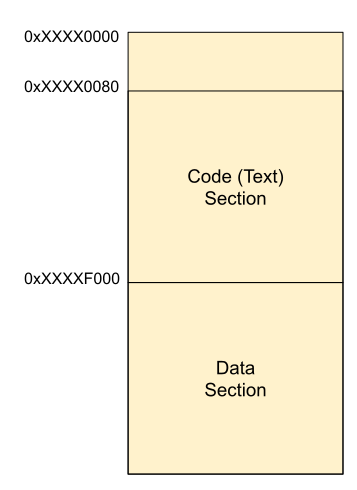
Relative text and data sections
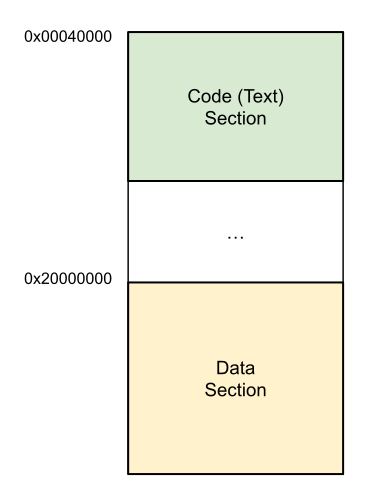
Non-relative text and data sections such as when text is in flash memory and data is in RAM
Thankfully, Tock and other embedded platforms have already (mostly) solved this problem in the past.
PIC Base Register
There is a GCC compiler flag (-mpic-register=r9) which reserves a register to always store the address of the GOT. We’ll refer to this as the PIC base register. This means that the compiler will not use the PIC base register for anything other than accessing the GOT. This means that compiler has one less register to work with for all other types of instructions.
Here’s our example of writing 1 to a global variable from before. This time, the left is using PC-relative accesses to the GOT and the right uses the PIC base register (r9).
Accessing GOT via hard-coded PC relative offset
 1foo:
 2; load PC-relative offset to GOT
 3ldr r3, [pc, 12]
 4; calculate actual GOT address
 5add r3, pc
 6; load var's offset inside GOT
 7ldr r2, [pc, 12]
 8; load location of var from GOT
 9ldr r3, [r3, r2]
10; write 1 to var
11movs    r2, 1
12str r2, [r3, 0]
13; return
14bx lrAccessing GOT via PIC register
 1foo:
 2; load var's offset inside GOT
 3ldr r2, [pc, 12]
 4; use the PIC base register (r9) to
 5; access var's GOT entry
 6ldr r3, [r9, r2]
 7; write 1 to var
 8movs    r2, 1
 9str r2, [r3, 0]
10; return
11bx lrr9. So we can use that to directly access the GOT entry of our global variable. Tock uses this compiler flag for compiling C user applications even without any shared libraries. The PIC base register is used for normal accesses to global data.
Tock C applications are also compiled with the -mno-pic-data-is-text-relative and -msingle-pic-base flags. The -mno-pic-data-is-text-relative flag explicitly tells the compiler to not assume that data and text sections will be relative to each other. This flag prevents global data accesses from being done using PC-relative addressing. Instead, the compiler generates code that accesses data members by going through the GOT. The -msingle-pic-base marks the PIC base register as read-only for the code that GCC generates. The ARM GCC manual has more information on all of these flags.
Setting PIC Base Register
Another question remains, how does the PIC base register get set in the first place? Tock has a bit of code run before the application starts up which performs this step. This is part of the crt0 or C runtime. This is a bit of code which runs before the application’s main function. For Tock applications written in C, the crt0 routine is responsible for setting up the PIC base register among other things such as copying GOT and data sections from the original binary into memory as well as actually calling the application’s main function. Here’s the Tock crt0 code. To help the crt0 know where the GOT section is within the binary, the linker annotates the binary with the location of the GOT within the executable. The linker does this because Tock C applications are linked with a custom linker script which defines this section called crt0_header.
Shared Libraries for TockOS
High Level Design
Just like on traditional operating systems, embedded operating systems will need a mechanism to perform relocations to perform function calls to shared libraries. Unlike traditional operating systems, embedded operating systems lack virtual memory and the ability to load code at arbitrary locations in a process’s address space.
Build configuration
Since the location of shared libraries in flash memory cannot be known at build time, shared libraries must be built as position independent code (PIC) as discussed earlier. This means that shared libraries will need to access their global data members via a Global Offset Table (GOT).
Performing relocations at flash-time
To perform the relocations needed to access shared library symbols, one option is to implement a dynamic linker similar to the ones used on desktop/server operating systems. Before the application starts executing, the dynamic linker would find the shared libraries the application depends on and perform the necessary relocations. Unlike desktop/server operating systems, embedded operating systems typically lack a file system, so the dynamic linker would need to traverse flash memory to find the shared libraries.
However, on embedded devices there is an opportunity for optimization. Once the shared library is built and flashed onto the device, the location of the shared libraries code will be at a constant physical address. Recall that embedded devices typically execute code directly from flash memory which removes the need for code sections to be loaded into memory. Since the code of the shared library will always be at the same location in flash memory, function calls to shared library functions can be resolved at “flash time”. In other words, references to the shared library functions can be resolved to directly point to the actual function addresses in flash memory for all processes. This optimization eliminates the overhead of resolving shared library symbols at runtime.
Kernel and runtime
Now that both the application and shared library code has been flashed and references to shared library symbols have been resolved, the next step is to allocate memory. The kernel will allocate memory for any shared libraries data sections that an application needs. Each application will get its own copy of the shared library’s data section to maintain isolation between applications.
Then, the C runtime takes care of copying the GOT and data sections of the shared library into application memory. It also sets up the PIC base register to point to the GOT of the shared library in application memory which allows shared library functions to access their own global data members.
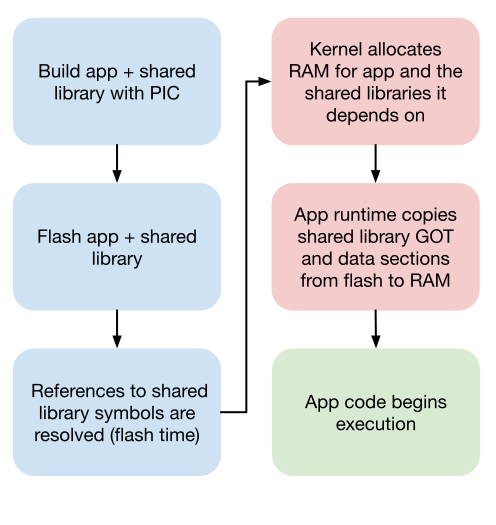
The blue boxes indicate steps that happen at build/flash time while the orange boxes indicate steps that happen at runtime when the application is started. Finally, the green box is the actual application code itself once any startup procedures have completed.
- The application and shared library code are built separately as position independent code (PIC).
- Both the application and shared library binaries are flashed onto the device.
- When the application is flashed, references shared library code are resolved. The location of the shared library code is known in flash, so any references in the application binary can be resolved.
- When the application is started, the operating system allocates memory for the application and any shared libraries it depends on.
- Before the app starts up, the app’s runtime copies the GOT and data sections from the shared library binary in flash into application memory.
- The application can start executing and making shared library function calls.
Implementation
I have updated the Tock operating system and its supporting tools to support shared libraries. Applications are able to call into shared library code where the library code can perform its own global data accesses. With that being said, the implementation is limited in scope and exhibits a few limitations. This implementation targets applications and shared libraries written in the C programming language, compiled with GCC for the 32-bit ARM architecture.
Let’s start by examining what changes to PIC on Tock when we want to add shared libraries to the mix.
Let’s have a new running example with a sample application which calls into a function provided by a shared library. The shared library function makes an access to it’s global variable.
Application
|
|
Shared Library
|
|
Calling a Shared Library Function
Calls to shared library functions need to be resolved at runtime as the compiler/linker doesn’t know where the shared library code will be loaded into memory. Recall the workings of the PLT, when a shared library function is called, execution first transfers to code from an entry in the PLT. Once the location of the function is resolved, the PLT code will look up the location of the function in the GOT and jump to that address.
The code in the PLT needs to access entries in the GOT to know where the function exists. This raises the question: how does PLT code access the GOT? PLT code is just like the other text sections and is executed directly from flash memory. As with text, when executing PLT code from flash, any lookups to the GOT cannot be done in a PC-relative fashion since the offset between text and data sections can’t be known at compile-time. Similar to GOT accesses for global data, code in the PLT should use the special PIC base register discussed earlier (if compiled with -mpic-register).
PLT doesn’t use PIC base register
However, the code generated by arm-none-eabi-gcc version 14.2.1 only generates PC-relative GOT accesses in the PLT and not via the PIC base register. Interestingly, other accesses to the GOT (e.g. global variables) all compile correctly and use the PIC base register to do so. It’s only the GOT accesses within the PLT entries which are PC-relative.
Here’s the objdump of the compiled ELF binary from the above application code example showcasing the generated assembly for the main function and .plt section.
180000072 <main>:
280000072: 2017 movs r0, #23
380000074: f001 baa4 b.w 800015c0 <_etext+0x10>
4...
5800015b0 <.plt>:
6800015b0: b500 push {lr}
7800015b2: f8df e008 ldr.w lr, [pc, #8] @ 800015bc <.plt+0xc>
8800015b6: 44fe add lr, pc
9800015b8: f85e ff08 ldr.w pc, [lr, #8]!
10800015bc: 7ffff2d4 svcvc 0x00fff2d4
11; ***function call starts by jumping to here***
12800015c0: f24f 2cd0 movw ip, #62160 @ 0xf2d0
13800015c4: f6c7 7cff movt ip, #32767 @ 0x7fff
14800015c8: 44fc add ip, pc
15800015ca: f8dc f000 ldr.w pc, [ip]
16800015ce: e7fc b.n 800015ca <.plt+0x1a>Let’s walk through what’s going wrong:
- The code in main is relatively simple as it loads the first argument (the constant 23) into
r0and performs a jump to address0x800015c0. - Looking at address
0x800015c0leads to code in the.pltsection. The linesmovw ip, #62160andmovt ip, #32767set registeripto the value0x7ffff2d0(movtsets the high 16 bits of the destination while leaving the lower 16 untouched). - The next line at address
0x800015c8incrementsip(which is0x7ffff2d0) by the program counter (which is0x800015ca). This line setsipto the value of an entry in the GOT by using an offset relative to the program counter. This is where the problem with this code arises. As mentioned above, PC-relative accesses to the GOT cannot be done since the distance between text and data sections is not known at compile time (which is when this code was generated). - Finally, line
0x800015cadereferences the new value ofipand sets the program counter. Recall in the previous line whereipis meant to hold the address of a GOT entry. By setting program counter, this line attempts to jump to the address held in the GOT entry thatipis pointing to. However, as noted in the previous line, the offset between this code (which is in flash) and the GOT section (which will exist in memory) cannot be known at this time.
There is a post to the GNU ARM Embedded Toolchain Q&A which describes the same bug. A user reported using the same flags (-msingle-pic-base -mpic-register=r9 -mno-pic-data-is-text-relative) and saw that their PLT code also exhibits PC-relative addressing to the GOT, instead of using the PIC base register r9. The post includes ARM assembly similar to that of the PLT entry from the objdump above. Unfortunately, this post was made in 2018 and has no replies.
One can assume this is a unintended behavior on the part of GCC. Why should only PLT got accesses be PC-relative while all other ones respect the compiler flags and use r9 to access the GOT? With this in mind, there are a few options to have function calls to shared library functions working:
- Patch ARM Embedded GCC
- Rewrite PLT entries to use PIC base addressing
- Bypass the PLT and jump directly to the function address held in a GOT entry
While patching GCC is the most direct way to fix this problem, it is out of scope for this particular project. However, this section discusses potential patches to GCC in more depth.
Rewriting the code in the PLT entries is a promising option. Simply replace the existing PC-relative PLT code with instructions that will look up into the GOT using the PIC base register. However, this seems simpler than it is in reality. How does one locate the instructions to rewrite? Are they just any instructions that match exactly what GCC generates in the .plt section? It’s possible that the new instructions take up more space and need to shift around other parts of the binary. Also, the compiled code is using an instruction set called Thumb-2 which is a compressed version of the ARM architecture where each instruction can be either 16 or 32 bits wide, further complicating any binary parsing.
-fno-plt
Bypassing the PLT is what this implementation opted for. To bypass the PLT, there is a GCC code generation flag called -fno-plt which meets the criteria. The GCC documentation describes it as such:
Do not use the PLT for external function calls in position-independent code. Instead, load the callee address at call sites from the GOT and branch to it.
This means, as long as the right GOT entry is populated with the function address, application code can jump directly to the address in that GOT entry when making a shared library call.
While this flag appears to achieve the intended goal of directly accessing function addresses via the GOT, inspection of the generated code shows no difference in code generation. With the flag enabled on arm-none-eabi-gcc version 14.2.1, the PLT is still generated, and the code makes jumps to the PLT. Another post on the GNU ARM Embedded Q&A, titled “Option -fno-plt has no effect”, experiences the same issue with the -fno-plt flag. One of the replies state that “Support for -fno-plt is not implemented presently”. However, another reply of the same post mentions an alternative. They state that “The use and creation of the plt can be circumvented by the use of function pointers. This will create a jump directly through GOT instead of creating a plt entry”.
Function calls via function pointers
Using function pointers certainly gets around using the PLT for function calls. Instead, the code loads the function pointer just as it would any other data access, dereferences the pointer and jumps to the resulting address. Below shows the difference in C code and generated assembly when declaring a function signature as a function pointer and calling the function. The main downside to using a function pointer is that it requires all shared library function declarations to be modified. These are typically found in the header files of libraries, so if a function pointer only header file was written for a library, it is possible that only the reference to the header could be swapped out with no changes to the rest of the actual application code.
int lib_func(int x);lib_func int (*lib_func)(int x);lib_func 1main:
2; Set argument 1 to 23
3movs r0, #23
4; Jump to PLT entry for lib_func
5b.w 80001730lib_func via PLT entry. 1main:
2; Load function pointer GOT offset
3ldr r3, [pc, #8]
4; Load GOT entry using PIC Base
5; register:
6; GOT Base (r9) + offset (r3)
7ldr.w r3, [r9, r3]
8; Set argument 1 to 23
9movs r0, #23
10; Dereference function pointer
11ldr r3, [r3, #0]
12; Jump directly to lib_func
13bx r3lib_func via a function pointer Shared Library data accesses
Now that we’re able to call shared library functions, how does the shared library code access its own global variables. Remember our running example where our shared library code accesses our global variable glob.
Clobbering PIC base register
The -mpic-register=r9 flag works fine in isolation, but the addition of shared libraries throws a wrench into the works. If shared libraries were also compiled with the same flags, the special PIC base register (r9) would be conflicting between the address of the application’s GOT and the shared library’s GOT. Both the application and shared library need access to their separate, respective GOT to access their own data section, so simply sharing the same PIC base register will not suffice.
One potential solution is to switch the value of the PIC base register when execution crosses the boundary between applications and shared libraries. The application calling the shared library function would be responsible for saving the value of its PIC base register (e.g. by pushing it onto the stack). Then, when control flow transfers to the shared library, it will restore the value of its own PIC base. When the library call completes, the library saves its PIC Base and the application restores its own.
Here’s some pseudo ARM assembly of the PIC base register r9 being saved and restored at the
function call boundary between applications and shared libraries:
Application
main:
...
push r9 ; save app PIC base
bl lib_func
pop r9 ; restore app PIC base
...Shared Library
lib_func:
ldr r9, ??? ; restore lib PIC base
... ; do work
str ???, r9 ; save lib PIC base
bx lr ; returnAn alternative approach could implement this functionality using a jump table, similar to the PLT. Every time the application calls a shared library function, it first jumps to a bit of code responsible for saving the PIC base before moving onto the actual library code. With regard to efficiency, this approach adds additional overhead on every shared library function call to save and restore the respective PIC base registers.
While this swapping of the PIC base seems promising, it raises a few questions. Where will the shared library restore its PIC base register value from? It can’t be stored in the data section since the PIC base register itself is needed to access the data section. It can’t be in the text section since the location of the GOT is known at runtime when memory is allocated. Additionally, GCC did not seem to have compiler flags which would generate the extra code needed to save and restore the PIC base on every shared library call.
Reserving a shared library PIC base register
As a means to achieve a working proof of concept, the idea to have applications and shared libraries shared a single register was put on hold. Instead, this implementation opts to set aside other registers to act as the PIC base for shared libraries. This way, both the application and shared library can coexist without clobbering the other’s PIC base register. For example, if r9 is reserved as the application PIC base, r10 could be the first shared library’s PIC base, r11 for the second and so on.
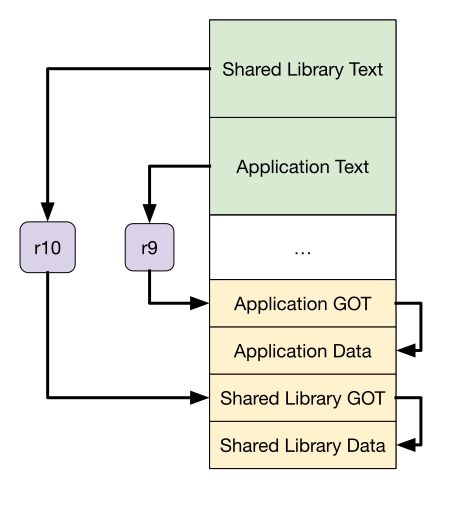
Overview of an application and a shared library both accessing their own data sections via separate PIC base registers. Green represents flash memory and yellow represents RAM.
As for initializing the shared library’s PIC base register, the application startup (crt0) routine can set the PIC base registers for each library that it is using. The shared library would be compiled with the -msingle-pic-base option which would make GCC avoid using its PIC base register (e.g. r10) in any code generation of the library. However, this would not prevent the compiler from emitting code that clobbers the library’s PIC base register since the application is compiled separately.
One way to have GCC avoid using the library’s PIC base register is to use a GCC feature called Global Register Variables. It will reserve a register to be used exclusively for a specific global variable. As long as the application doesn’t use this global variable, the register will remain untouched by GCC.
The main drawback to this approach is that the number of shared libraries a single app can use is limited to how many registers are available to be reserved to be PIC bases. There’s thirteen general purpose registers on an architecture like ARMv7-M. Several are already reserved by the calling convention to be used for passing function arguments. r9 is already taken as the PIC base for the application which doesn’t leave too many registers left for shared library PIC bases. Additionally, with fewer registers available for the compiler to use, performance may take a hit as the compiler might generate code which performs more memory accesses due to the limited pool of registers available.
In summary, these are the additional GCC flags chosen for compiling shared libraries (Note that the register chosen for -mpic-register isn’t required to be r10. It must be different from r9 and the PIC base of any other shared library linked with a given application):
-fPIC-shared-mpic-register=r10-msingle-pic-base-mno-pic-data-is-text-relative
In addition to these compiler/linker flags, there were changes to the linker script used for libtock-c applications. The linker script has instructions for the linker that describe how to lay out sections in the final binary. Tock already has a linker script for applications which I modified to organize where “dynamic” sections end up (these are sections in the ELF binary to help an application access shared libraries). In addition, I created a new linker script to be used for when the shared library’s own sections need to be linked.
Performing relocations
elf2tab
Tock supports many boards across multiple architectures. When compiling applications, the Tock build system will compile for all architectures all at once, creating many ELF binaries. Tock bundles these binaries into a Tock Application Bundle (TAB). A TAB is also known as a fat binary, it is quite literally a tar archive of the executable file across several architecture.
elf2tab is a tool which does what it sounds like: it takes multiple ELF binaries and combines them into a single TAB file. In addition, elf2tab prefixes each ELF binary a Tock Binary Format (TBF) header. This header describes metadata useful to the kernel and Tockloader, such as the entrypoint of the application’s program, package name, permissions and more.
Here’s a good ASCII diagram from the Tock book:
Tock App Binary:
Start of app ─►┌──────────────────────┐◄┐ ◄┐ ◄┐
│ TBF Header │ │ Protected │ │
├──────────────────────┤ │ region │ │
│ Protected trailer │ │ │ Covered │
│ (Optional) │ │ │ by │
├──────────────────────┤◄┘ │ integrity │
│ │ │ │ Total
│ Userspace │ │ │ size
│ Binary │ │ │
│ │ │ │
│ │ │ │
│ │ │ │
├──────────────────────┤ ◄┘ │
│ TBF Footer │ │
│ (Optional) │ │
├──────────────────────┤ │
│ Padding (Optional) │ │
└──────────────────────┘ ◄┘To support shared libraries, elf2tab was modified to collect information which is useful for Tockloader to perform relocations later. Since elf2tab already parses the ELF binaries, it’s able to inspect what references to shared library symbols require relocations.
elf2tab needs to tell Tockloader two pieces of information to bridge the gap for shared library function calls:
- Where the shared library function lives within the shared library executable.
- Where to patch the reference to the shared library function within the GOT of the application binary.
For #1, once we know the names of the shared library functions, we can look them up in the shared library’s ELF symbol table. We know the names of the functions to look for by examining the dynamic symbol table of the application’s ELF binary.
To mirror what elf2tab is doing while parsing the application and shared library ELF binaries, we can print out the same information with readelf:
arm-none-eabi-readelf --symbols libtest/build/cortex-m4/libtest.so1Symbol table '.symtab' contains 42 entries:
2 Num: Value Size Type Bind Vis Ndx Name
3 0: 00000000 0 NOTYPE LOCAL DEFAULT UND
4 1: 00000000 0 SECTION LOCAL DEFAULT 1 .got
5 2: 80000000 0 SECTION LOCAL DEFAULT 2 .crt0_header
6 3: 80000028 0 SECTION LOCAL DEFAULT 3 .dynsym
7 4: 80000108 0 SECTION LOCAL DEFAULT 4 .dynstr
8...
9 31: 800001ad 32 FUNC GLOBAL DEFAULT 11 lib_funcreadelf to see where our shared library function exists in the shared library ELF binary. arm-none-eabi-readelf --dyn-syms examples/shlib_app/build/cortex-m4/cortex-m4.elf 1Symbol table '.dynsym' contains 11 entries:
2 Num: Value Size Type Bind Vis Ndx Name
3 0: 00000000 0 NOTYPE LOCAL DEFAULT UND
4 1: 00000000 0 FUNC GLOBAL DEFAULT UND lib_func
5 2: 80001ff6 0 NOTYPE GLOBAL DEFAULT 10 _etext
6 3: 00070000 0 NOTYPE GLOBAL DEFAULT ABS PROG_LENGTH
7 4: 00000000 0 NOTYPE WEAK DEFAULT UND _printf_float
8 5: 00000000 0 NOTYPE WEAK DEFAULT UND __call_exitprocs
9 6: 000009ec 0 NOTYPE GLOBAL DEFAULT 14 _bss
10 7: 00010000 0 NOTYPE GLOBAL DEFAULT ABS RAM_LENGTH
11 8: 80000180 0 NOTYPE GLOBAL DEFAULT 10 _text
12 9: 000008ec 0 NOTYPE GLOBAL DEFAULT 6 _data
13 10: 00000800 0 NOTYPE GLOBAL DEFAULT 1 _gotreadelf to see what dynamic symbols our application depends on by examining its “dynamic symbol” table For #2, we can look through the application’s relocation table (such as .rel.text) to tell us where relocations exist and which ones match the function names we are looking for.
Once elf2tab has grabbed this information, it needs to pass it onto Tockloader to actually perform the relocations. As mentioned earlier, TAB files are just a tar archive, so I added one more file to the archive to describe this information. It’s a TOML file with the following format:
[lib_func]
app_name = "shlib_app"
app_got_addr = 0x1f20
lib_name = "libtest"
lib_func_offset = 0x80000029elf2tab saves to a TOML file and passes onto Tockloader. The TOML file contains a section for each function (e.g. lib_func). Within each section, it describes how an app depends on a given shared library function. The field app_got_addr represents the location of the GOT entry in the application binary. Specifically it is the address within the application TBF file created by elf2tab. This address is slightly different than where the GOT entry is located in the original ELF file because elf2tab changes the layout of the sections. Recall from the key points that Tockloader, will perform relocations during flash time. So it will be modifying the app’s GOT directly in flash memory. The Tockloader section will dive more into this. Once the value at this location in the binary is patched, the correct value will be carried over once the .got section is loaded into memory at application startup. The field lib_name indicates the Tock package name of the shared library which contains the function being called. Finally, the lib_func_offset field represents the location of the function in the shared library. Note that this isn’t an offset into the shared library ELF file but the address that the linker assigned to the function symbol at link-time. The address starts with 0x8000____ because the linker script places flash sections starting from 0x80000000.
In addition to this relocation TOML file, elf2tab adds a new TBF header which describes if the current TBF represents a shared library or not. Secondly, this TBF header contains the package names of any shared libraries this TBF depends on. These package names are represented as a sequence of null-terminated strings as seen in the diagram below. This is the same information found in the DT_NEEDED entries of the “dynamic” section of an ELF binary. Since the Tock kernel doesn’t parse the ELF binary, elf2tab can extract the names of shared library dependencies and provide them to the kernel as a TBF header.
0 2 4 6 8
+-------------+-------------+---------------------------+
| Type (11) | Length (4+n)| is_shlib (length 4) |
+-------------+-------------+---------------------------+
| shlib_deps (length n) |
+--------------------------------------------------...--+ To summarize what we’ve done so far, the figure below shows the full installation process and dependency graph for flashing a shared library and dependent application onto a board. The last step before runtime, is to use Tockloader for flashing (which the next section will dive into).
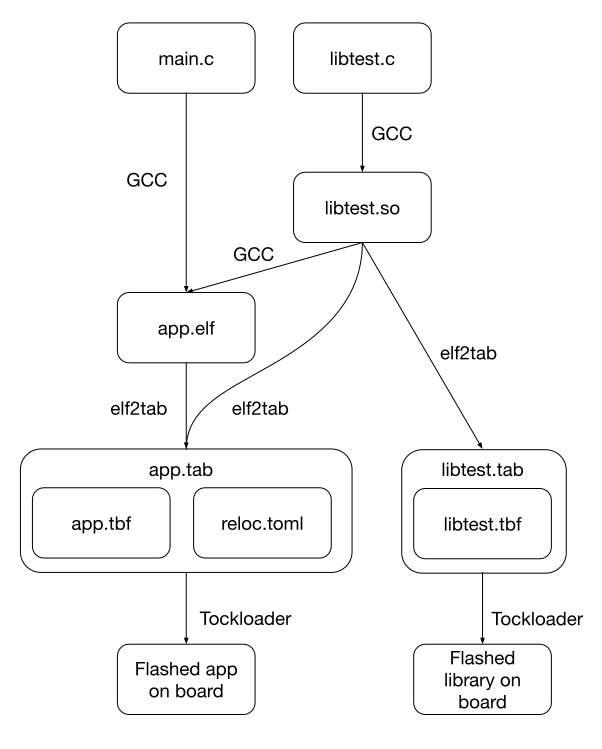
Dependency Graph of Installing Shared Libraries and Applications
Tockloader
Ok, we’ve done our prep, now it’s time for the relocations. Tockloader will bridge the gap between the application and the shared library. Tockloader will take the place of the traditional dynamic linker/loader (i.e. ld-linux.so).
Tockloader knows exactly which applications are running on a board at the time when applications are flashed 3. This means that Tockloader can perform any relocations needed for shared library function calls since it knows where both applications and shared libraries are located in flash memory. Therefore, relocations done by Tockloader incur no runtime cost since they occur when applications are being flashed, not at runtime.
So, first the shared library must be flashed onto the board. Tockloader doesn’t do anything special here and just slots it among other applications wherever it finds space in flash memory. As mentioned in the elf2tab, any Tock binary now has a TBF header which indicates if the binary is an application or a shared library which allows Tockloader to distinguish between the two while traversing binaries in flash memory.
Once the shared library is flashed, the application TBF can be flashed. Tockloader reads the relocation TOML file proved by elf2tab and modifies the application binary before flashing it. Tockloader starts by reading the applications and shared libraries already flashed on the board. Once Tockloader finds the shared library specified as a dependency in the TOML file, it notes its location in flash.
Then, Tockloader patches the application binary before flashing it onto the board. It knows exactly where the GOT entry is in the executable file, so it has no need to perform additional ELF parsing. It just writes the location of the shared library function to the application’s corresponding GOT entry.
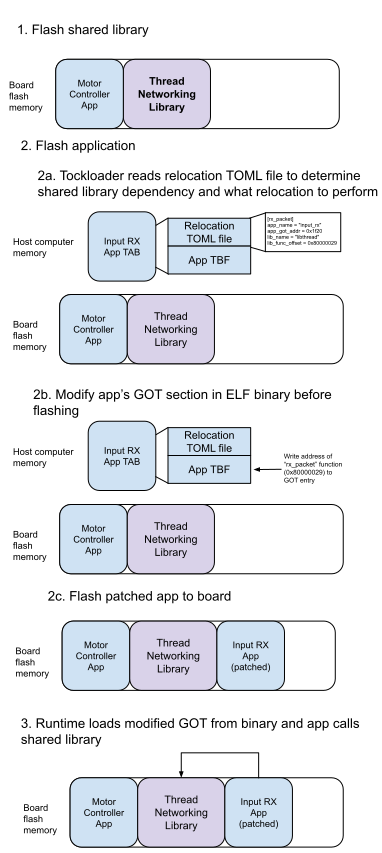
Procedure of Tockloader performing relocations on applications while the app binary is loaded on the host computer's memory. Patching the binary happens before the app is flashed and the board starts running.
Imagine we're flashing a board which controls a robot vacuum. It needs to control motors and listen to the network for a command to start cleaning. So we have one app to drive the motors and another app to accept commands to start vacuuming from the network. In addition, there's a shared library to perform the networking operations (using Thread).
Let's go through what's going on step by step.
- First, let's flash the "Thread Networking" shared library to the board. This is flashed like any other app and is slotted among the existing apps (in this case the "Motor Controller App").
- The next step covers everything that's needed to flash an application that depends on a shared library. Here we are flashing the "Input RX App" which depends on the "Thread Networking" shared library.
- Tockloader extracts the relocation TOML file which elf2tab prepared earlier. As a reminder, this contains the information Tockloader needs to rewrite application's GOT entry so that it points to the location of the shared library in flash memory. The relocation TOML file doesn't contain the actual location of the shared library function in flash memory, since elf2tab doesn't know the layout of libraries on the board's storage. However, it contains the offset of the shared library function code within the shared library itself. Tockloader then uses this offset in combination with the actual location of where the shared library starts in flash storage (it knows this by traversing all the apps and shared libraries on the board's storage).
- Now that Tockloader knows where to patch the GOT in the app's binary and what to patch it with (the actual location of the function in flash), it can perform the modification. Note that Tockloader modifies the GOT in the binary before it gets flashed. So, this write happens in the memory of the host machine that Tockloader is running on (think of your development laptop plugged into a board).
- Finally, Tockloader flushes the modified app to the flash storage of the board.
- Now, the board has started running. After the kernel loads the app, the app's runtime copies the GOT entries (which Tockloader modified) to RAM (volatile memory). Then, the app can freely refer to the modified GOT to call into the shared library function.
The following example shows how application code will use the patched GOT after Tockloader performs its relocations:
Application C code
int (*lib_func)(int x);
int main(void) {
int result = lib_func(23);
return result;
}Compiled assembly of application code
1800001e4 <main>:
2800001e4: 4b02 ldr r3, [pc, #8] @ (800001f0)
3800001e6: f859 3003 ldr.w r3, [r9, r3]
4800001ea: 2017 movs r0, #23
5800001ec: 681b ldr r3, [r3, #0]
6800001ee: 4718 bx r3
7800001f0: 00000050 andeq r0, r0, r0, asr r0r9 points to the start of the GOT (0x00000800 in the ELF file address space or at runtime: 0x00000800 + application memory start). Note that line at address 800001e4 is loading the constant from address 800001f0. This constant represents the offset into the GOT for the lib_func function pointer. 00000800 <_got>:
...
850: 00000000
...0x00000800 and our function pointer entry is at 0x00000850 00000800 <_got>:
...
850: 00044055
...lib_func code. This address is refers to a location in flash memory within the shared library that has lib_func. With the function pointer workaround discussed earlier, Tockloader must add an extra level of indirection when performing the relocation. When calling a function via a function pointer, the code the compiler emits will first try to dereference the function pointer before jumping to the resulting address. This means that Tockloader cannot simply write the address of the function into the GOT entry. Instead, it must write the address of the function into another location and then write the address of that location into the GOT entry. This way, when the application dereferences the function pointer from the GOT, it will get the correct function address to jump to. In the implementation, Tockloader appends these function addresses to the end of the application binary and writes the address of these appended locations into the GOT entries.
Runtime
Tock Kernel
Shared libraries were chosen to closely match the format and layout of Tock applications. They already use the same TBF format, so the kernel can parse them and load them just the same as any other Tock application. When the kernel is loading shared libraries and applications from flash, the main difference is that it doesn’t schedule shared libraries to be scheduled like normal applications are. To determine which entities are applications or shared libraries, it checks the shared library header of the TBF.
Once the kernel loads an application which depends on a shared library, it allocates enough memory for the data sections of the shared library on top of the memory requested by the main application. The kernel also sets up the Memory Protection Unit (MPU) accordingly with which shared library an application needs. 4 When an application is executing, it will have an MPU region allocated for every shared library it is using. This MPU region will have read and execute permissions to allow the application to jump into the sections of flash that contain the shared library text sections. When a context switch to another application occurs, the kernel already swaps out MPU regions.
libtock-c and crt0
Finally, the application startup crt0 routine needed to be updated to support shared libraries. Recall from earlier, how libtock-c includes code which sets up the stack, PIC base register, GOT, data sections, and BSS sections. crt0 needed to be modified to perform required setup for shared libraries.
Just like for applications, crt0 needs to copy over the shared library GOT sections from the binary in flash to memory. To discover where the shared library exists in flash storage and where to copy the GOT/data sections to RAM, it gets some support from the kernel. I’ve added a system call to the kernel which reports where a shared library binary exists in flash storage and where the kernel allocated the memory for the data section of a shared library for a given process. Here’s the kernel implementation and here’s where crt0 invokes it.
/// - `0`: Driver existence check, always returns Ok(())
/// - `1`: Get address of where a given shared library is located
/// in flash. Expects `shlib_id` to be the shared library
/// identifier. Returns the flash address in the success value.
/// - `2`: Get memory location where a given shared library is
/// loaded in RAM for the current process. Expects
/// `shlib_id` to be the shared library identifier. Returns the
/// RAM address in the success value.
fn command(
&self,
command_number: usize,
shlib_id: usize,
_: usize,
processid: ProcessId,
) -> CommandReturn {Then, crt0 will read the first few bytes of the shared library in flash to read the shared library’s crt0_header section. crt0_header is a header created by the linker script which is placed at the start of an application binary. The new linker script for shared libraries also creates a crt0_header which contains locations of sections such as the GOT, data and BSS within the shared library binary. Knowledge of these locations is useful for crt0 as it can know exactly where to fetch sections from the app binary in flash.
.crt0_header :
{
/**
* Populate the header expected by `crt0`:
*
* struct hdr {
* uint32_t got_sym_start;
* uint32_t got_start;
* uint32_t got_size;
* uint32_t data_sym_start;
* uint32_t data_start;
* uint32_t data_size;
* uint32_t bss_start;
* uint32_t bss_size;
* uint32_t reldata_start;
* uint32_t stack_size;
* };
*/
/* Offset of GOT symbols in flash from the start of the application
* binary. */
LONG(LOADADDR(.got) - ORIGIN(FLASH));
/* Offset of where the GOT section will be placed in memory from the
* beginning of the app's assigned memory. */
LONG(_got - ORIGIN(SRAM));
/* Size of GOT section. */
LONG(SIZEOF(.got));
/* Offset of data symbols in flash from the start of the application
* binary. */
LONG(LOADADDR(.data) - ORIGIN(FLASH));
/* Offset of where the data section will be placed in memory from the
* beginning of the app's assigned memory. */
LONG(_data - ORIGIN(SRAM));
/* Size of data section. */
LONG(SIZEOF(.data));
/* Offset of where the BSS section will be placed in memory from the
* beginning of the app's assigned memory. */
LONG(_bss - ORIGIN(SRAM));
/* Size of BSS section */
LONG(SIZEOF(.bss));
/* First address offset after program flash, where elf2tab places
* .rel.data section */
LONG(LOADADDR(.endflash) - ORIGIN(FLASH));
/* The size of the stack requested by this application */
LONG(0x00);
} > FLASH =0xFFcrt0_header In addition, it sets the shared library’s separate PIC base register (e.g. r10) as outlined here. Since it just loaded where the shared library’s GOT is in memory, it knows exactly what to set the PIC base register to.
And that’s it! That’s an overview of the modifications made to Tock to support shared libraries. If you want to see the code you can find some links here in the walkthrough section.
Key findings
This section summarizes the key findings of this work. Basically, here are two important things I discovered while doing this project (among many others which I’ve been talking about). These two were just important enough to highlight here.
Relocations can be performed at flash-time
On embedded systems where you know exactly what processes are running on a board before it boots up, relocations can be performed while programs are flashed onto the board. If you know where shared libraries live in flash, then point the app there! This saves time at application startup, unlike traditional operating system which do all dynamic linking at runtime.
Additional compiler support is needed to avoid clobbering PIC base register
To avoid the workaround of using a separate PIC base register for the shared library’s own GOT accesses, the compiler needs to support swapping between values of a single PIC base register. This could look like a routine on every shared library function call which pops the application’s PIC base register, keeps it safe somewhere in memory, and sets the PIC base register to where the shared library’s GOT is located. When the shared library function returns, the inverse operation is performed and the application’s PIC base is restored. The “Future Work” section of the thesis talks about this and other compiler modifications in much more detail.
Walkthrough
Enough talking. Let’s actually flash this stuff onto a board and see an application call into a shared library.
Source Code
You’ll need to grab a checkout of the Tock related projects I’ve been talking about which have the necessary modifications to support shared libraries. Make sure to checkout the shared-libaries branch of each of the projects from each of the repositories linked below:
| Project | Description | Link |
|---|---|---|
| Tock | the kernel itself | github.com/atar13/tock/tree/shared-libraries |
| libtock-c | application runtime and build infrastructure | github.com/atar13/libtock-c/tree/shared-libraries |
| elf2tab | combines multiple architecture specific ELF binaries into one fat binary (TAB) | github.com/atar13/elf2tab/tree/shared-libraries |
| Tockloader | flashes the kernel/apps onto physical hardware (and performs shared library function relocations for this project) | github.com/atar13/tockloader/tree/shared-libraries |
Hardware Dependencies
This walkthrough assumes you have a nRF52840DK. However, this should would work with any ARM board that Tock supports. See the /boards/ directory in the Tock kernel repo for all the supported boards.
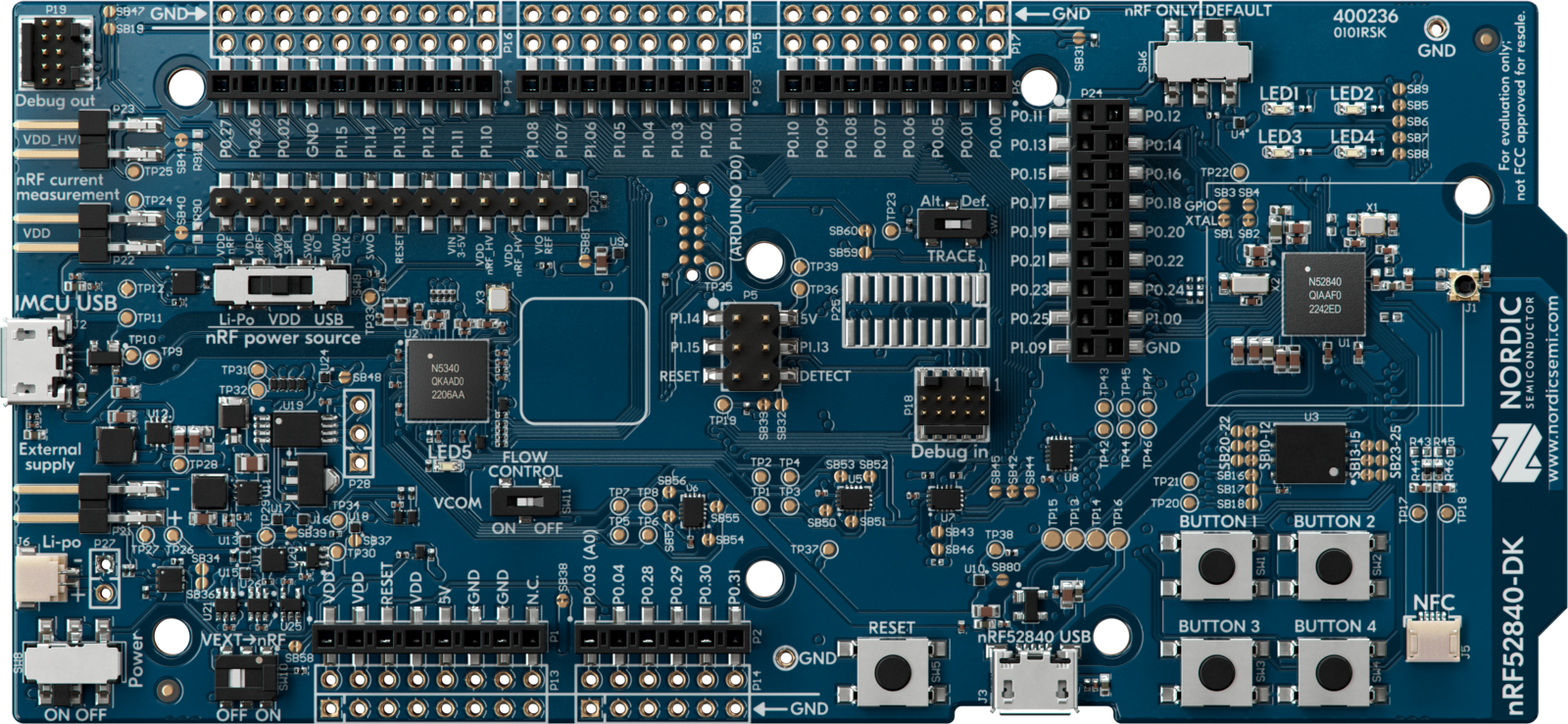
nrf52840DK board
Software Dependencies
Each Tock project’s README.md will have the most accurate setup information. Here is a page which outlines some of the necessary tools for working with Tock.
Nix
How could I go this far without mentioning Nix? If you use the Nix package manager, you can quickly get setup with each project’s respective dependencies. You can use the provided shell.nix and flake.nix files in the root of each repository to enter a shell with the necessary dependencies. For example, to enter a shell with the dependencies for libtock-c, run nix-shell in the root of the libtock-c repository. If you’re familiar with Nix flakes, Tockloader and elf2tab have a flake.nix file which can be used to enter a shell with pinned versions of dependencies via running nix develop in the root of the repository. If the shell fails to build, grab a new shell.nix from the upstream repository since my fork’s version might become out of date.
Building and flashing the Tock kernel
Clone the fork of the Tock kernel from github.com/atar13/tock/tree/shared-libraries and set your current directory as the root directory of the project.
Run the following commands to build the modified Tock kernel and flash it onto the Nordic nRF52840DK board. The make flash command assumes you have tockloader available in your shell (in a directory in your PATH environment variable). Flashing the kernel doesn’t require a modified version of tockloader unlike when flashing applications and shared libraries (as we will see very shortly). So, you can use an existing tockloader from pip (as the kernel’s README.md points to).
cd boards/nordic/nrf52840dk
make flash If you run into permission issues when flashing the board, it’s likely that you don’t have permission to access your serial port. On Linux, make sure your user is a member of the dialout group. Once the kernel is flashed, run tockloader listen to verify it is running. If the kernel is up and running, you should see the following console prompt. Type help + the Return key to see the available commands.
tock$First step done. We have the Tock kernel running on our board with no apps. Let’s change that.
Building a shared library
Clone the fork of libtock-c from github.com/atar13/libtock-c/tree/shared-libraries and set your current directory as the root directory of the project. Compile the sample shared library to produce libtest.so (which can be found in libtest/build/cortex-m4/libtest after building).
cd libtest
makeThe source code of the shared library is relatively simple and contains one function (lib_func) which is defined as such (found at libtest/lib.c).
#include "lib.h"
int glob = 42;

int lib_func(int x) {
    return x + glob;
}Building an application
We will compile the sample application which makes a call to our shared library function (lib func) and prints the result.
int glob = 42;

int lib_func(int x) {
    return x + glob;
}
Set your current directory to the root of the libtock c repository and run the following commands.
cd examples/shlib_app
make
Here is the source code of the sample application(found at examples/shlib app/main.c). To keep this demo simple, the printf and libtocksync_alarm_delay_ms functions are statically linked into the application binary.
int app_glob = 10;

int main(void) {
    while (1) {
        int result = lib_func(app_glob);
        printf("lib_func(%d) = %d\n", app_glob, result);
        libtocksync_alarm_delay_ms(1000);
    }
}
If you want to inspect the assembly generated by the compiler, feel free to objdump the application ELF binary.
 1
 2800001c4 <main>:
 3800001c4:       b538            push    {r3, r4, r5, lr}
 4800001c6:       4b0a            ldr     r3, [pc, #40]   @ (800001f0 <main+0x2c>)
 5800001c8:       f859 4003       ldr.w   r4, [r9, r3]
 6800001cc:       4b09            ldr     r3, [pc, #36]   @ (800001f4 <main+0x30>)
 7800001ce:       f859 5003       ldr.w   r5, [r9, r3]
 8800001d2:       682b            ldr     r3, [r5, #0]
 9800001d4:       6820            ldr     r0, [r4, #0]
10800001d6:       4798            blx     r3
11800001d8:       4b07            ldr     r3, [pc, #28]   @ (800001f8 <main+0x34>)
12800001da:       6821            ldr     r1, [r4, #0]
13800001dc:       4602            mov     r2, r0
14800001de:       f859 0003       ldr.w   r0, [r9, r3]
15800001e2:       f000 fa55       bl      80000690 <iprintf>
16800001e6:       f44f 707a       mov.w   r0, #1000       @ 0x3e8
17800001ea:       f000 fa0b       bl      80000604 <libtocksync_alarm_delay_ms>
18800001ee:       e7f0            b.n     800001d2 <main+0xe>
19800001f0:       000000a0        andeq   r0, r0, r0, lsr #1
20800001f4:       00000090        muleq   r0, r0, r0
21800001f8: 00000000 andeq r0, r0, r0Create shared library TAB file
Clone the fork of elf2tab from github.com/atar13/libtock-c/tree/shared-libraries and set your current directory as the root directory of the project. The following commands build the modified version of elf2tab.
cargo build --releaseNow, use it to create a TAB file from the shared library ELF file that was built earlier. Make sure to update the path to the libtest.so file. The provided command assumes libtest.so is in the
build directory of libtock-c/libtest and that libtock-c is adjacent to the elf2tab folder. Alternatively, the same command is provided in the script: ./elf2tab_shared_library.sh.
./target/release/elf2tab -n libtest --stack 2048 --app-heap 1024 --kernel-heap 1024 --kernel-major 2 --kernel-minor 0 --minimum-footer-size 3000 -v -o libtest.tab ../libtock-c/libtest/build/cortex-m4/libtest.soCreate application TAB file
Like the previous step, elf2tab will generate a TAB file from the application ELF file. Note that this command requires the --shared_library_deps option to point to the shared library binary (.so file). Alternatively, the same command is provided in the script:
./elf2tab_application.sh.
./target/release/elf2tab -n shlib_app --stack 2048 --app-heap 1024 --kernel-heap 1024 --kernel-major 2 --kernel-minor 0 --minimum-footer-size 3000 --shared_library_deps ../libtock-c/libtest/build/cortex-m4/libtest.so -v -o shlib_app.tab ../libtock-c/examples/shlib_app/build/cortex-m4/cortex-m4.elfTo see the relocation TOML file which elf2tab generates, run the following commands to extract it from the TAB:
mkdir shlib_app_extracted
tar xvf shlib_app.tab --directory shlib_app_extracted
cat shlib_app_extracted/cortex-m4-reloc.toml
[lib_func]
app_name = "shlib_app"
app_got_addr = 0x2118
lib_name = "libtest"
lib_func_offset = 0x800001adFlash Shared Library to board
Clone the fork of Tockloader from github.com/atar13/tockloader/tree/shared-libraries and set your current directory as the root directory of the project. Be sure that you use this modified version of Tockloader and not the standard release of Tockloader which may be in your shell’s PATH after installing with pip/pipx. Like the commands before, the following command assumes your clone of Tockloader is adjacent to elf2tab.
python3 -m tockloader.main install ../elf2tab/libtest.tab
Verify the shared library has been flashed by running:
python3 -m tockloader.main list
There should be an entry for the shared library that looks this:
┌──────────────────────────────────────────────────┐
│ Shared Library 0                                 |
└──────────────────────────────────────────────────┘
  Name:                  libtest
  Version:               0
  Enabled:               True
  Sticky:                False
  Total Size in Flash:   4096 bytes
Flash Application to board
Similar to the previous step, we will use Tockloader to flash the application which depends on the shared library.
python3 -m tockloader.main install ../elf2tab/shlib_app.tabAgain, verify the application has been flashed by running:
python3 -m tockloader.main listThere should be an entry for the application that looks like this:
┌──────────────────────────────────────────────────┐
│ App 0                                            |
└──────────────────────────────────────────────────┘
  Name:                  shlib_app
  Version:               0
  Enabled:               True
  Sticky:                False
Total Size in Flash: 16384 bytesVerify application output
Finally, use tockloader to connect to the board’s serial output and verify the application is running and correctly calling into the shared library.
python3 -m tockloader.main listenlib_func(10) = 52
lib_func(10) = 52
lib_func(10) = 52
...Recall from the example application code, that the shared library function lib_func adds 42 to its argument. Since the application is passing in 10, the expected result is 52. So, it looks like our library call is working!
Feel free to modify the application and shared library code to experiment with different function calls and arguments. Just remember to rebuild the shared library and application, create new TAB files, and re-flash them onto the board.
Debugging
If you start hacking on this, you need to know what to do when the board panics, because it will happen (many times).
Thankfully, Tock has a great panic debug screen which helps a ton.
If the board seems unresponsive (i.e. no print statements showing up in serial logs). Hit the reset button and see if you see a panic message from Tock.
It should look something like this:
panicked at kernel/src/shared_library_lookup.rs:38:9:
explicit panic
	Kernel version release-2.2-rc1-153-gdf3bce315

---| Cortex-M Fault Status |---
No Cortex-M faults detected.

---| App Status |---
𝐀𝐩𝐩: shlib_app   -   [Running]
 Events Queued: 0   Syscall Count: 4   Dropped Upcall Count: 0
 Restart Count: 0
 Last Syscall: Command { driver_number: 65537, subdriver_number: 1, arg0: 0, arg1: 0 }
 Completion Code: None
Shared library starts at 0x2000C870
Great! Now we have a starting point to figure out what went wrong.
If you panic in the kernel, no sweat. Tock will print out the exact line of Rust code which caused the panic.
In the example above it’s at line 38 of kernel/src/shared_library_lookup.rs.
If you panic in userspace, things get a little trickier…
Process had a fault
In the huge panic debug output, find the address where the process faulted at
---| Cortex-M Fault Status |---
Precise Data Bus Error:             true
Forced Hard Fault:                  true
Bus Fault Address:                  0xE000EDFC
Fault Status Register (CFSR):       0x00008200
Hard Fault Status Register (HFSR):  0x40000000
R0 : 0x0004005C R6 : 0x0004005C
R1 : 0x2000A000 R7 : 0x2000A000
R2 : 0x00004000 R8 : 0x00000000
R3 : 0xE000ED00 R10: 0x00000000
R4 : 0x0004005C R11: 0x00000000
R5 : 0x00000000 R12: 0xD80EC4C2
R9 : 0x2000A800 (Static Base Register)
SP : 0x2000A7B8 (Process Stack Pointer)
LR : 0x000402DD
PC : 0x000402A2
YPC : 0x00040230Ok, based on the PC register (program counter) we have the instruction where the process faulted. Let’s go find what this instruction means.
The kernel told us the shared library code was found in flash at address 0x00044000 from the following debug statement when the board panicked. (This debug statement is part of my modified crt0 header, so you might not have it.
Shared Library in flash=0x00044000-0x00044FFF process="libtest"We can use tockloader to dump the contents of flash at this address. Tockloader doesn’t have an interface for dumping at a specific address so we can specify the page number.
tockloader dump-page 64Adjust the page number if the addresess printed out on the left aren’t correct.
This line contains the address of the PC when the fault ocurred.
000402a0 09 4b d3 f8 fc 20 d2 01 5e bf d3 f8 fc 20 42 f0 |.K... ..^.... B.|000402a2 is the third byte here (d3).
One way to interpret the instruction is to find the same pattern of bytes in the binary (it’s not the most exact approach but it gets the job done). This is from hexyl, which is a fantastic hex dump program. 5
│00001240│ 04 00 00 00 09 4b d3 f8 ┊ fc 20 d2 01 5e bf d3 f8 │•⋄⋄⋄_K××┊× ×•^×××│Then, you can use objdump with -D to match up these bytes to the human-readable (ish) assembly (or skip hexyl_. In objdump, the leftmost column contains the address location, the second columns contain the bytes themselves, and the third column has the assembly. Beware, that the bytes in the second column are in the opposite order as shown in tockloader dump-page and hexyl (hence why I suggested starting in hexyl instead of going straight to objdump). So, in this example, if we’re looking for the crashing instruction at 000402a2 in flash, the data in flash looks like d3 f8, but might show up in objdump as the bytes f8d3.
Ok, now we know where our code is crashing. Now, the hard part, figuring out why its crashing. Feel free to inspect any registers based on the register report from earlier. Think about what the crashing assembly is doing and what each register should look like. If it’s helpful, you can print out variables in your code such as the addresses during the setup that crt0 performs (if your printf is working… wait for the next section). NOTE, any changes made to crt0.c require a recompile of the libtock library (currently a static library). cd libtock && make.
Dirty Debugging
When you don’t have printf, make the kernel print it for you via syscall:
  volatile uint32_t x = (uint32_t)(myhdr->reldata_start);
#if defined(__thumb__)
    // uncomment this to print a register!
    // "mov r0, r10\n"
  __asm__ volatile (
    "mov r0, %[debug]\n" : [debug] "+r" (x)
  );
  __asm__ volatile (
    "svc 23\n"
  );
#endif
And then apply this diff to the kernel to panic on any system call and print out r0. Not the most elegant, but it works…
diff --git a/arch/cortex-m/src/syscall.rs b/arch/cortex-m/src/syscall.rs
index ea88cd98c..62e6bd2ef 100644
--- a/arch/cortex-m/src/syscall.rs
+++ b/arch/cortex-m/src/syscall.rs
@@ -10,6 +10,7 @@ use core::marker::PhantomData;
 use core::mem::{self, size_of};
 use core::ops::Range;
 use core::ptr::{self, addr_of, addr_of_mut, read_volatile, write_volatile};
+use kernel::debug;
 use kernel::errorcode::ErrorCode;

 use crate::CortexMVariant;
@@ -318,6 +319,11 @@ impl<A: CortexMVariant> kernel::syscall::UserspaceKernelBoundary for SysCall<A>
                 r3.into(),
             );

+            if syscall.is_none() {
+                panic!("app made syscall with num {} and r0 of 0x{:08x}", svc_num, r0);
+            }
+
             match syscall {
                 Some(s) => kernel::syscall::ContextSwitchReason::SyscallFired { syscall: s },
                 None => kernel::syscall::ContextSwitchReason::Fault,
Print out all the memory
Throughout this project, I needed to print out lots of memory dumps. Here’s a snippet in Rust for the kernel:
for i in (0..rel_data.len() - 1).step_by(16) {
	print!("0x:{:08X}", i);
	for j in i..(16 + i) {
		if j > rel_data.len() - 1  {
			break;
		}
		print!(" {:02X} ", rel_data[j]);
	}
	println!();
}
And one in Python for Tockloader:
def print_bytes(buf):
	for i in range(0, len(buf), 16):
		print(f"0x{i:08X}:", end="")
		for j in range(i,(16 + i)):
			if j > len(buf) - 1:
				break;
			print(f" {buf[j]:02X} ", end="")
print()-
This whole section is heavily inspired by this incredible blog post by Eli Bendersky. ↩︎
-
I will be referring to flash storage/memory and normal memory (aka RAM) and it’s important to know the difference between the two. Flash storage/memory is persistent storage commonly used for embedded devices. Think of an SD card for a camera or USB “flash” drive, but on the board of an embedded device. One relevant use of flash is storing executable programs. In fact, many embedded systems execute code directly from flash without loading it into main memory. Memory (aka RAM) is not persistent. Anytime, the power goes off you lose the data. This is used for any variables during the program’s execution (global, static, local, etc). ↩︎
-
This assumption doesn’t hold up as well with the addition of dynamic application loading, but we won’t consider that for this project) ↩︎
-
The MPU is a piece of hardware which enforces memory isolation. Think of how on a traditional operating system, you can’t access the memory of an another process. The MPU provides that functionality for embedded systems which lack a traditional MMU. Tock configures the MPU to restrict processes from accessing memory not allocated to them. ↩︎
-
As great hexyl as is, after working on this project I got very tired of staring at hex dumps… ↩︎